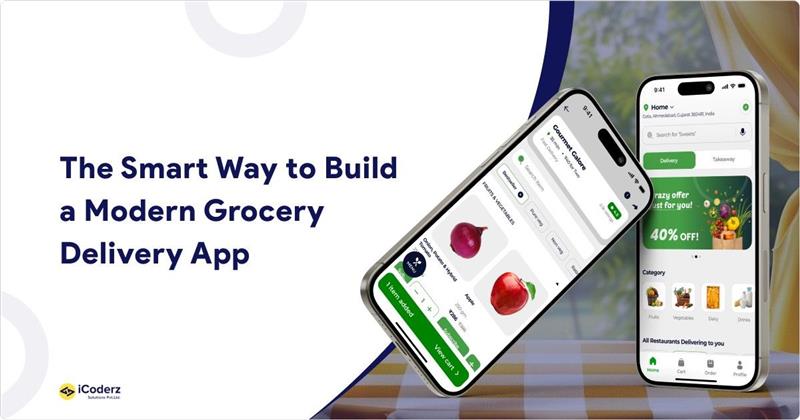
Flutter is a strong choice for grocery delivery app development because it allows businesses to build Android and iOS applications from a shared codebase while maintaining consistent UI, strong performance, and simpler maintenance. For businesses evaluating the right technology, Flutter for grocery delivery app development offers a practical approach to building scalable, cross-platform grocery applications.
If your grocery app feels slow, looks inconsistent between Android and iOS, or is costing more to maintain than expected, your technology stack may be part of the problem. That’s one reason businesses consider Flutter grocery delivery app development when they want to balance development speed, performance, and cross-platform consistency. This guide breaks down why Flutter works, what a complete grocery app needs, what it costs, and how it compares to React Native.
What Is Flutter Grocery Delivery App Development?
Flutter is Google’s open-source UI toolkit for building compiled applications from a single codebase. In a grocery delivery business, Flutter can be used to build the customer and delivery partner apps for Android and iOS, while Flutter Web can also power browser-based dashboards where appropriate.
Flutter compiles Dart code to native machine code for mobile platforms and uses its own rendering engine, which helps developers deliver responsive, consistent experiences, even with large product catalogs, live order tracking, and busy checkout flows. You can read more about how a full online grocery delivery app works end to end.
Why Choose Flutter for a Grocery Delivery App?
Flutter can reduce development effort compared with maintaining separate native codebases, because Android and iOS applications can share much of the same code.
- Cross-platform development: Flutter allows developers to share much of the same codebase across Android and iOS, reducing duplicated development work.
- Faster builds: Hot Reload lets developers see UI changes instantly, which speeds up testing and MVP iteration.
- Lower maintenance overhead: Updates and bug fixes are typically written once and applied across both platforms, instead of maintained separately.
- Consistent performance: Compiled Dart code and Flutter’s own rendering engine help apps stay smooth and responsive, even with large catalogs and frequent updates.
- Consistent UI/UX: Because Flutter draws its own UI rather than relying on native components, the same design renders identically on every device.
- Easy integrations: Flutter has mature packages for connecting payment gateways, maps, push notifications, and analytics tools.
- Real-time capabilities: Flutter integrates with real-time backends, location services, and APIs to support live order tracking and inventory updates.
- Scalable: The framework’s modular, widget-based structure makes it easier to add new features without rebuilding the app from scratch.
- Strong ecosystem: Flutter is backed by Google and supported by a large, active developer community, which helps with long-term support and hiring.
If you’re weighing your options early, it’s worth browsing a few grocery app development ideas before locking in your feature list.
Essential Features of a Flutter Grocery Delivery App
A typical multi-sided grocery platform may include a customer app, a delivery partner app, and an admin dashboard. Depending on the business model, vendor or store-management applications may also be required. Each core app needs its own feature set, outlined in more depth in this guide to features of grocery delivery app development.
Customer App: login, search and filters, cart, wishlist, multiple payment options, order tracking, ratings, push notifications
Delivery Partner App: order management, navigation, live location tracking, delivery status, earnings dashboard
Admin Dashboard: inventory management, order management, delivery management, coupons, analytics and reports
Flutter Grocery Delivery App Architecture
A reliable Flutter grocery delivery app architecture has clear layers: the Flutter frontend, a backend/API layer for business logic, a database for products and orders, a payment gateway, maps and location services, push notification services, and third-party integrations tying it all together.
Getting this right from day one avoids costly rework later; see this breakdown of the best tech stack for grocery app projects for a deeper look at each layer.
Flutter vs React Native for Grocery Delivery Apps
Both frameworks are strong, capable choices for grocery delivery apps, and the right pick depends on your team and priorities.
| Factor | Flutter | React Native |
| Development speed | Fast, with a shared codebase and Hot Reload | Fast, with a shared codebase and Fast Refresh |
| Performance | Strong, via compiled Dart and Flutter’s rendering architecture | Strong, via modern native integration and optimized architecture |
| UI consistency | Highly consistent across platforms | Can use platform-native components and behaviors |
| Custom UI | Extensive widget-based customization | Strong customization through React Native components and libraries |
| Ecosystem | Large and growing | Mature JavaScript/React ecosystem |
| Maintenance | Shared codebase can simplify maintenance | Shared codebase can simplify maintenance |
| Best suited for | Consistent cross-platform experiences and custom UI | Teams already invested in the React/JavaScript ecosystem |
Many of the apps ranked in this list of the best grocery delivery app platforms use this kind of cross-platform architecture.
Flutter Grocery Delivery App Development Cost
Cost depends on platforms, feature complexity, UI/UX polish, backend depth, and integrations. A basic app with core ordering and payment features costs noticeably less than a full multi-app ecosystem with live tracking and analytics.
As a general industry benchmark, a Flutter grocery delivery app typically falls into one of three cost tiers:
| Tier | Typical Range | What’s Included |
| MVP / Basic | $25,000 – $70,000 | Single-store model, core ordering, cart, payments, basic tracking |
| Mid-Range | $70,000 – $200,000 | Customer + delivery partner apps, admin dashboard, real-time tracking, multiple payment options |
| Advanced / Enterprise | $200,000 – $400,000+ | Multi-vendor or multi-region support, AI features, advanced analytics, deep third-party integrations |
These figures are broad industry estimates, not an iCoderz-specific quote; actual cost varies significantly based on your feature list, design requirements, and the development team’s location and rates. Development team location alone can shift the number substantially: teams in South Asia typically bill at lower hourly rates than North America or Western Europe, which affects the total more than almost any other factor.
For a full breakdown by feature and team location, see this detailed guide on the cost to develop a grocery delivery app.
How Long Does It Take — and How Do You Build One?
Timeline depends on scope, but the phases stay consistent: planning, UI/UX design, Flutter development, backend/API work, testing, deployment, and post-launch support.
If you want the step-by-step process from business model to launch, this guide covers how to develop a grocery delivery app in full.
Which Business Model Fits Your App?
Before development starts, decide how your app will operate. Most grocery businesses choose between a single-store model, a multi vendor grocery marketplace, or a hyperlocal, fast-delivery setup.
If speed is a priority, it’s worth looking at how to build a dark store grocery delivery model, which many quick-commerce apps rely on for fast local deliveries.
Revenue matters just as much as the model itself — commission fees, delivery charges, subscriptions, and ads are all common paths, covered in more detail under grocery delivery app monetization.
A Hypothetical Example
Consider a regional retail chain moving from a single native Android application to a Flutter-based ecosystem covering customer and delivery partner apps. With a shared codebase, the business can target Android and iOS while simplifying ongoing development and maintenance, rather than running two separate native teams. Retail chains scaling to multiple locations face a somewhat different set of needs, which this guide on grocery delivery app development for retail chains covers well.
Security and Trust
Grocery apps handle payment data, addresses, and order history, so security has to be built in from the start — not bolted on later. Flutter provides the tools and integrations needed to implement secure workflows, but overall security depends on the app’s architecture, backend, and development practices. Key considerations include:
- Secure API communication using HTTPS/TLS
- Secure authentication and token management
- Secure local storage
- Payment gateway tokenization
- Role-based access control
- Server-side validation
- Regular dependency and package updates
- Logging and monitoring
This guide on grocery delivery app security covers these essentials in more detail.
Challenges of Using Flutter for Grocery Apps
Flutter isn’t friction-free. Highly specialized native functionality, occasional plugin gaps, and platform-specific requirements can slow things down on very large apps. The fix is experienced developers, reliable plugins, and solid architecture planning — the same issues (and solutions) covered in this piece on challenges faced by online grocery store operators.
When Should You Choose Flutter for a Grocery Delivery App?
Flutter tends to be a strong fit when you:
- Need both Android and iOS apps
- Want faster MVP development
- Want a shared codebase across platforms
- Need a consistent UI across devices
- Have budget constraints
- Want to launch quickly and iterate
- Expect to scale features over time
When Flutter may not be the best choice:
- The app depends on highly platform-specific functionality
- It requires deep native integrations
- It needs extremely specialized hardware capabilities
- You already have a large native codebase that would be costly to migrate
AI in Grocery Apps: A Quick Look Ahead
Flutter’s flexibility also makes it a reasonable base for adding AI-driven features later, such as product recommendations, AI-assisted search, demand forecasting, personalized offers, and chatbot-based customer support. If you’re planning ahead, this piece on AI-powered grocery delivery app development explores this in more depth.
Why Choose an Experienced Flutter Development Partner?
Flutter’s advantages only translate into a good app when the team behind it knows how to use the framework well; architecture decisions, plugin choices, and API design matter as much as the framework itself.
What separates an experienced Flutter partner from a general development shop:
- Architecture decisions made upfront. Grocery apps need to handle large catalogs, concurrent orders, and live inventory changes without slowdowns. An experienced team plans the data layer, API structure, and caching strategy before writing UI code, not after performance problems show up.
- Real-time systems done right. Live order tracking and driver location updates depend on how well the app is wired to a real-time backend (Firebase, WebSockets, or similar). Teams who’ve built this before know the common failure points — battery drain from constant location polling, dropped connections, sync conflicts — and design around them from the start.
- Sound plugin and package choices. Flutter’s ecosystem is large, but not every package is well-maintained. An experienced team knows which plugins are production-ready for payments, maps, and notifications, and which ones cause problems six months post-launch.
- Multi-app coordination. Building a customer app, delivery partner app, and admin dashboard that all stay in sync requires more planning than building any one of them alone. This is where inexperienced teams often create the most rework.
- Post-launch support. A grocery app isn’t done at launch — OS updates, plugin updates, new payment methods, and scaling needs all require ongoing attention. A partner who thinks past launch day saves you from a second, more expensive rebuild later.
Questions worth asking any Flutter development partner before you commit:
- Have they built apps with real-time tracking, live inventory, or similar concurrency demands before?
- Can they walk you through their approach to app architecture, not just their UI portfolio?
- What does their post-launch support and maintenance process actually look like?
- Do they have references or case studies specific to on-demand or delivery apps, not just Flutter apps in general?
If you’re evaluating partners, it’s worth asking about their experience with real-time systems, multi-vendor architectures, and post-launch support — not just their Flutter development speed.
Final Verdict: Is Flutter for Grocery Delivery App Development a Good Choice?
For many grocery businesses, yes. Flutter supports fast development, a consistent UI, and simplified maintenance across a shared codebase, a combination that matters when you’re trying to launch efficiently and scale without a rebuild. The exception is apps that depend heavily on specialized native functionality, where a native approach may still make more sense.
Technology is only half the equation, though. Working with a team that has actually shipped Flutter grocery delivery app development services before matters just as much as the framework itself.
Build With Flutter
Create a fast, scalable grocery delivery app for Android and iOS.

FAQs
Is Flutter good for grocery delivery app development?
Yes. Flutter suits grocery delivery apps well because it supports Android and iOS from a shared codebase, offers strong UI customization, and integrates with APIs, payment gateways, maps, notifications, and real-time services — all common requirements for this type of app.
How much does it cost to build a grocery delivery app with Flutter?
Cost depends on the number of apps, features, and integrations involved. A basic app with core ordering and payment features costs less than a full platform with live tracking, multiple apps, and admin analytics built in.
How long does it take to develop a Flutter grocery app?
Timeline depends on scope. A simple MVP with core ordering features moves faster than a full platform with connected customer, delivery, and admin apps, a custom backend, and multiple third-party integrations.
Is Flutter better than React Native for grocery delivery apps?
Both are strong, capable frameworks for building grocery apps. Flutter tends to offer more UI consistency across platforms, while React Native has a longer track record and a large JavaScript ecosystem. The right choice depends on your team and priorities.
Can Flutter handle real-time grocery order tracking?
Yes. When paired with a real-time backend such as Firebase or a WebSocket-based service, Flutter can support live order tracking, delivery status updates, and driver location tracking within the app.
Can Flutter integrate payment gateways and APIs?
Yes. Flutter has mature, well-maintained packages for integrating popular payment gateways, maps, notification services, and backend APIs, which makes third-party integration straightforward for most grocery app use cases.
Is Flutter suitable for a scalable grocery delivery platform?
Yes. Its modular, widget-based structure makes it easier to add new features, screens, and integrations as order volume and business complexity grow, without requiring a full rebuild of the app.
Can I build customer, delivery partner, and admin apps using Flutter?
Customer and delivery partner apps can be built natively in Flutter for Android and iOS. Admin dashboards are often built using Flutter Web or a separate web application, depending on the project’s specific requirements.
Is Flutter secure enough for handling payments and user data?
Flutter provides the tools and integrations needed to implement secure authentication and payment workflows. Overall security still depends on the app’s architecture, backend, third-party integrations, and the development team’s security practices.
Should a startup use Flutter for its first grocery app?
Often, yes. Flutter’s shared codebase and faster iteration cycle make it a practical option for a first launch or MVP, letting startups test the market before investing in deeper platform-specific customization later on.