Flutter, a UI toolkit launched by Google, is now becoming a project favourite in mobile application development. But why use Flutter? It combines versatility and scalability. Flutter is intended to build mobile, web, and desktop applications using a native compilation mechanism. All UI elements, such as space between widgets or even the application theme, are widgets, following Flutter’s concept and guideline, ‘It is All Widgets.’
Here Are Some Points That Suggest Flutter’s Popularity.
- By 2024, Flutter has become popular in the developers’ circle.
- Flutter currently has a user base of over 500,000 developers, which indicates its trend of becoming increasingly popular in the future.
- Thousands of apps on Google Play and the Apple App Store are built with Flutter, including high-profile applications like Google Ads and Alibaba’s Xianyu.
- Flutter’s repository at GitHub is well documented and has over 150000 stars. It has been well received and is under active development.
In this blog, we will cover:
- Why selecting Flutter is an appealing option
- Flutter advantages and features
- Also, in this blog, you can learn What is the main purpose of Flutter?.
- Flutter development and implementation guidelines
- Flutter benefits, such as cross-platform development and incredible performance.
- Best recommendations on the architectural patterns in Flutter, hot-reload capability, and the appropriate use of third-party plugins.
- Also, some latest updates about flutters are included in this blog.
- These tips will be useful in helping you leverage Flutter for your next app development project.
What is Flutter?
Flutter is Google’s UI toolkit based on the Dart programming language. It allows developers to create native mobile, web, and desktop applications from one source code. Flutter was released in December 2018 and aims to build interactive and engaging user interfaces with high performance on different frameworks such as iOS, Android, Windows, macOS, Linux, and the web.
What Are the Features of Flutter?
Here Are Some Key Features of Flutter.
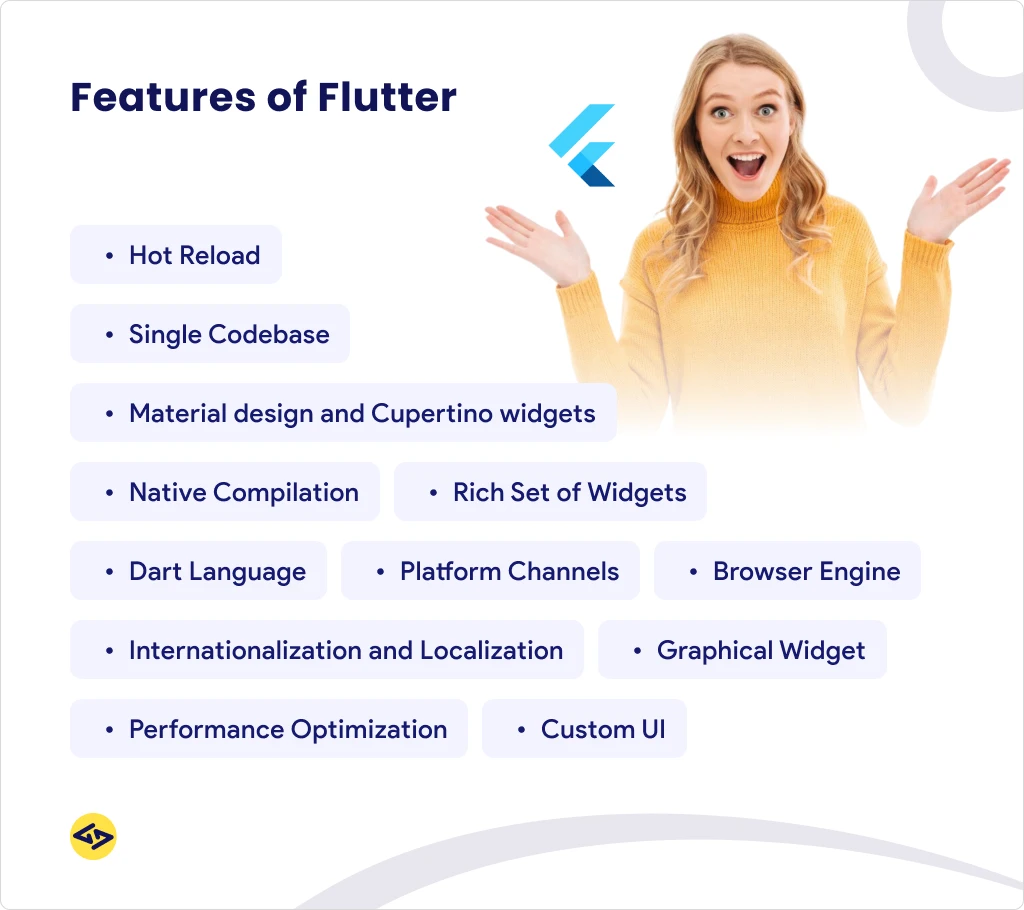
1) Hot Reload
Hot Reload helps developers preview the modifications made in the code practically immediately in the app while keeping its current state. This feature greatly enhances the development process due to its high efficiency in iterations and testing.
2) Graphical Widget
Flutter comes with a Graphic Widget system, with everything being a widget. This includes the format, design, and style of the web page, as well as the animations used on the web page. Widgets are very flexible objects and allow the creation of diverse, complex UIs based on their combination.
3) Single Codebase
With a Single Codebase, developers code once while getting applications that will run on iOS, Android, web, and desktop. This cuts development time and costs as there is no development of one code base for each platform that would require updates.
4) Custom UI
It boasts powerful features for creating Custom UIs, and developers can easily create distinctive designs that differ from typical platform interfaces. Such flexibility also helps brands retain their image in the applications.
5) Material design and Cupertino widgets
Flutter uses Material Components for developing Android apps and Cupertino widgets for iOS, which gives the application a native feel on both platforms while being compactly aligned with modern devices.
6) Browser Engine
The Browser Engine, for instance, Dart, which was specially developed to support web applications, enables the Flutter application to be run in the browser. This capability adds the capacity of applications created in Flutter to extend their applicability to more than just portable devices.
7) Rich Set of Widgets
Flutter is accompanied by a rich set of Widgets, which implies a set of blocks that can be used during development. Specifically, these widgets include buttons, sliders, forms, and many other functionalities to make it easier to develop complex interfaces.
8) Dart Language
Flutter uses the Dart Language since it is fully optimized for constructing user interfaces. The Dart programming language has some of the features such as strong typing beyond interfaces, support for async programming, and just-in-time (JIT) compilation that can boost performance during its development.
9) Platform Channels
Platform Channels send Dart code to native platform code, either Java/Kotlin for Android or Swift/ Objective C for iOS. It allows developers to use features of any platform not available through Flutter’s API.
10) Performance Optimization
Performance Optimization appears to be a part of Flutter that contains tools for processing the Widget fewer times and rendering performance. These tools assist with maintaining smoother motion controls and user interactions, even in more advanced applications.
ALSO READ: Top Flutter App Development Tools
11) Internationalization and Localization
Internationalization and Localization are well supported in Flutter, which helps make applications for various languages and areas. Built-in libraries make translation management and locale-specific formatting easy.
12) Native Compilation
In Native Compilation, Flutter converts code into native code for iOS and Android, as opposed to the interpreted just-in-time compilation used in AOT. This leads to the creation of high-performance applications and faster application execution compared to interpreted languages.
Top Reasons to Choose Flutter for App Development
Let’s delve into the specific Flutter development benefits that make it such a compelling choice:
1. True Cross-Platform Development (Single Codebase)
One of the most significant benefits of Flutter is its ability to build natively compiled applications for mobile (iOS and Android), web, and desktop (Windows, macOS, Linux) from a single codebase.
- Efficiency: Developers write code once in Dart, and it runs seamlessly on different platforms. This drastically reduces development time and effort compared to maintaining separate native codebases for iOS (Swift/Objective-C) and Android (Kotlin/Java).
- Cost-Effectiveness: Sharing a single codebase directly translates to reduced development costs. You need fewer developers, and the time saved means lower overall project expenses. This makes cost-effective Flutter development a reality for many businesses.
- Consistency: A single codebase ensures a consistent UI and feature set across all platforms, simplifying maintenance and reducing the likelihood of platform-specific bugs.
This “write once, run anywhere” philosophy is a primary answer to “Why Flutter is good for mobile apps” and a stark contrast to the complexities of traditional native development or the compromises often found in other cross-platform solutions.
2. Faster App Development & Time-to-Market
Flutter is engineered for speed, both in terms of developer productivity and application performance.
- Hot Reload & Hot Restart: These revolutionary features allow developers to inject code changes into a running application and see the results instantly without losing the application’s current state. This dramatically accelerates the iteration cycle, enabling rapid UI adjustments, feature additions, and bug fixes. This is a core reason for faster app development with Flutter.
- Rich Widget Catalog: Flutter comes with a comprehensive set of pre-built, customizable widgets that conform to both Material Design (Android) and Cupertino (iOS) guidelines. Developers can quickly assemble complex UIs without having to build every component from scratch.
- Declarative UI: Flutter uses a declarative UI paradigm, meaning you describe what the UI should look like, and Flutter handles the rendering. This makes UI code more predictable, easier to read, and less prone to errors.
The combination of these features significantly cuts down the development timeline, allowing businesses to launch their applications faster and gain a competitive edge.
3. Exceptional Performance (Near-Native Experience)
When evaluating “How Flutter improves app performance,” its architectural design is key.
- Direct Compilation to Native Code: Unlike frameworks that rely on JavaScript bridges, Flutter compiles Dart code directly to native ARM machine code. This eliminates performance bottlenecks often associated with communication between JavaScript and native layers.
- Skia Graphics Engine: Flutter uses its own high-performance Skia rendering engine (the same one used by Google Chrome and Android) to draw pixels directly to the screen. This gives Flutter complete control over the UI, resulting in incredibly smooth animations (often 60 FPS or even 120 FPS on capable devices) and a highly responsive user experience.
- No OEM Widget Dependency: Flutter doesn’t use OEM (Original Equipment Manufacturer) widgets. Instead, it draws its own widgets. This ensures consistency across devices and versions and prevents performance issues that can arise from inconsistent OEM implementations.
These factors contribute to Flutter performance benefits that deliver an app experience virtually indistinguishable from a natively built application.
4. Beautiful and Expressive UIs (Pixel-Perfect Control)
Flutter empowers developers and designers to create visually stunning and highly customized user interfaces.
- Customizable Widgets: Every part of a Flutter app is a widget. These widgets are composable and highly customizable, allowing for intricate and unique designs.
- Declarative UI Syntax: Flutter’s declarative approach, combined with the power of Dart, makes it easy to create complex and animated UIs.
- Rich Animation Support: Flutter provides robust animation libraries and tools, making it straightforward to implement fluid transitions, engaging micro-interactions, and captivating animations that enhance the user experience.
- Consistent Across Platforms: Because Flutter draws its own UI, you can achieve a perfectly consistent look and feel across iOS and Android, or adapt your UI to match platform conventions (Material Design for Android, Cupertino for iOS) with ease.
This capability for building highly expressive and engaging UIs is a strong answer to “Why Flutter is good for mobile apps” from a user experience perspective.
5. Strong Community Support & Growing Ecosystem
A thriving community and a rich ecosystem are vital for any framework’s long-term viability.
- Google’s Backing: Being developed and maintained by Google provides Flutter with significant resources, continuous updates, and a clear roadmap for the future.
- Vibrant Open-Source Community: Flutter has one of the fastest-growing developer communities. This means a wealth of shared knowledge, tutorials, solutions, and active forums (Stack Overflow, GitHub, Reddit).
- Extensive Package Manager (pub.dev): The pub.dev repository hosts thousands of ready-to-use packages and plugins, allowing developers to easily integrate functionalities like payment gateways, analytics, device APIs, and more, further accelerating development.
The active community and expanding ecosystem ensure that developers always have access to support and resources, making Flutter development benefits more tangible.
6. Access to Native Features and APIs
While cross-platform, Flutter doesn’t sacrifice access to native device functionalities.
- Platform Channels: Flutter provides “platform channels” to communicate with platform-specific code written in Kotlin/Java for Android or Swift/Objective-C for iOS. This allows developers to access any native feature, such as cameras, GPS, biometric sensors, Bluetooth, or even integrate with platform-specific SDKs.
- Plugins: For common native features, numerous pre-built plugins are available on pub.dev, abstracting away the platform-specific code. If a plugin doesn’t exist, it’s relatively straightforward to write a custom one.
This ability to leverage the best of both worlds – cross-platform efficiency with native access – is a compelling reason for “Why Flutter is good for mobile apps” that require deep hardware integration.
7. Reduced Testing Efforts
With a single codebase for multiple platforms, testing becomes significantly more efficient.
- Fewer Bugs: A unified codebase naturally means fewer potential bugs arising from discrepancies between separate platform-specific implementations.
- Streamlined QA: Quality Assurance teams can test one codebase, rather than two (or more), which reduces the overall testing time and effort. This contributes to cost-effective Flutter development by optimizing QA resources.
- Automated Testing: Flutter’s architecture is highly conducive to automated testing, supporting unit tests, widget tests (for UI components), and integration tests.
This reduction in testing complexity and time is a major Flutter advantage for project managers and QA teams.
8. Ideal for MVPs and Startups
For startups looking to validate an idea and get to market quickly, Flutter is an excellent choice.
- Rapid Prototyping: Faster app development with Flutter allows for quick iteration and prototyping, crucial for gathering early user feedback.
- Lower Initial Investment: The ability to build for multiple platforms with a single team and codebase can significantly reduce the initial development costs, making cost-effective Flutter development a reality for budget-conscious startups.
- Wider Audience Reach: By launching on both iOS and Android simultaneously, startups can reach a broader audience from day one.
These factors make Flutter a powerful tool for startups aiming for efficient growth and market penetration.
Flutter vs. Other Frameworks: A Quick Look
While this guide focuses on “Why use Flutter,” it’s helpful to briefly understand its standing against other options.
- Flutter vs. Native (Kotlin/Swift): Native offers ultimate performance and direct OS integration, but at the cost of separate codebases, higher development time, and increased cost for multi-platform apps. Flutter aims for near-native performance and cross-platform efficiency.
- Flutter vs. React Native: Both are popular cross-platform frameworks. Flutter renders its UI directly to a canvas using Skia, offering consistent UI and often better performance. React Native uses a JavaScript bridge to communicate with native UI components. Flutter is often cited for having a steeper learning curve for non-Dart developers but offering higher performance and stability once mastered.
- Flutter vs. Xamarin/Ionic: Flutter is generally considered more performant and offers a richer UI experience than web-view-based or older cross-platform solutions due to its native compilation and rendering approach.
The specific Flutter vs other frameworks comparison depends on project needs, but Flutter consistently stands out for its performance, UI capabilities, and development speed for cross-platform applications.
Next-Level Flutter: The 2024 Updates That Cannot Be Missed
| Updates | Details | |
| 1 | Google I/O 3.22 Release | |
| Adaptive and Responsive Design | Detailed section replacing fragmented descriptions. | |
| First Week Experience | Guide for inexperienced Flutter specialists to progress after completing the code lab. | |
| Flutter Install Docs | Updated installation documentation for easier setup. | |
| Games Toolkit | Updated Casual Games Toolkit with three new code labs and one guide. | |
| Web Assembly (Wasm) | Stable support for Web Assembly, improving web application performance | |
| DevTools | New screen in Android for evaluating deep links. | |
| Web Bootstrapping | New page with information on web bootstrapping for Flutter SDK release 3.22 and later. | |
| Asset Transformation | Support for converting assets to another format at runtime. | |
| 2 | Dart 3.4 Release | |
| JsonCodable Macro | New language macro for serializing and deserializing JSON data. | |
| Future Macros | Allows developers to build their macros, providing more freedom in software creation. | |
| 3 | Website Infrastructure Updates | |
| Improved Workflow | Modernized architecture for a more streamlined structure. | |
| New Sections | Launch of the New AI and improved Monetization in the App Solutions submenu. | |
| 4 | Recent Articles | |
| Insights | Updates on Dart 3.3 release and other Flutter developments. | |
| 5 | Flutter and Dart 2024 Roadmap | Outlines future directions and priorities for Flutter and Dart. |
| 6 | Harnessing the Gemini API | New guidance on integrating the Gemini API into Dart and Flutter apps. |
| 7 | Material Design Updates | |
| Migration to Material 3 | New guide and practices for migrating from Material 2 to Material 3. | |
| Theming Updates | Updated Instructions reflecting the new Material 3 theming practices. |
Conclusion: Embrace the Future of App Development with Flutter
The question “Why use Flutter for app development?” has a clear and compelling answer: it offers an unparalleled combination of speed, performance, and flexibility, allowing you to build beautiful, highly functional applications across multiple platforms with greater efficiency and lower cost.
From its revolutionary hot reload to its pixel-perfect rendering engine and robust community support, Flutter provides a comprehensive toolkit for modern app development. Whether you’re a startup looking to accelerate your product launch, an enterprise seeking to streamline your mobile strategy, or a developer eager to build stunning applications, embracing Flutter means investing in a technology that delivers exceptional results. The benefits of Flutter are undeniable, positioning it as a frontrunner for the future of mobile and cross-platform application development.
Looking to streamline your app development process?
Find out why Flutter is the perfect choice.